
Passwords stay on your device. Sync via your own Google Drive.
Your passwords, 2FA verification codes, cards, and notes are never stored on developer servers or third-party cloud. Everything stays protected right on your device—and only if you choose to sync across your phone and PC browser extension does SovPass connect directly to your own Google Drive.
- 100% stored on your device — zero provider servers or cloud
- Optional sync connects directly to your own Google Drive
- Passwords, 2FA QR (10 Free / Unlimited Pro), cards & notes
- Two-way Phone ↔ Chrome/Edge Browser Extension sync
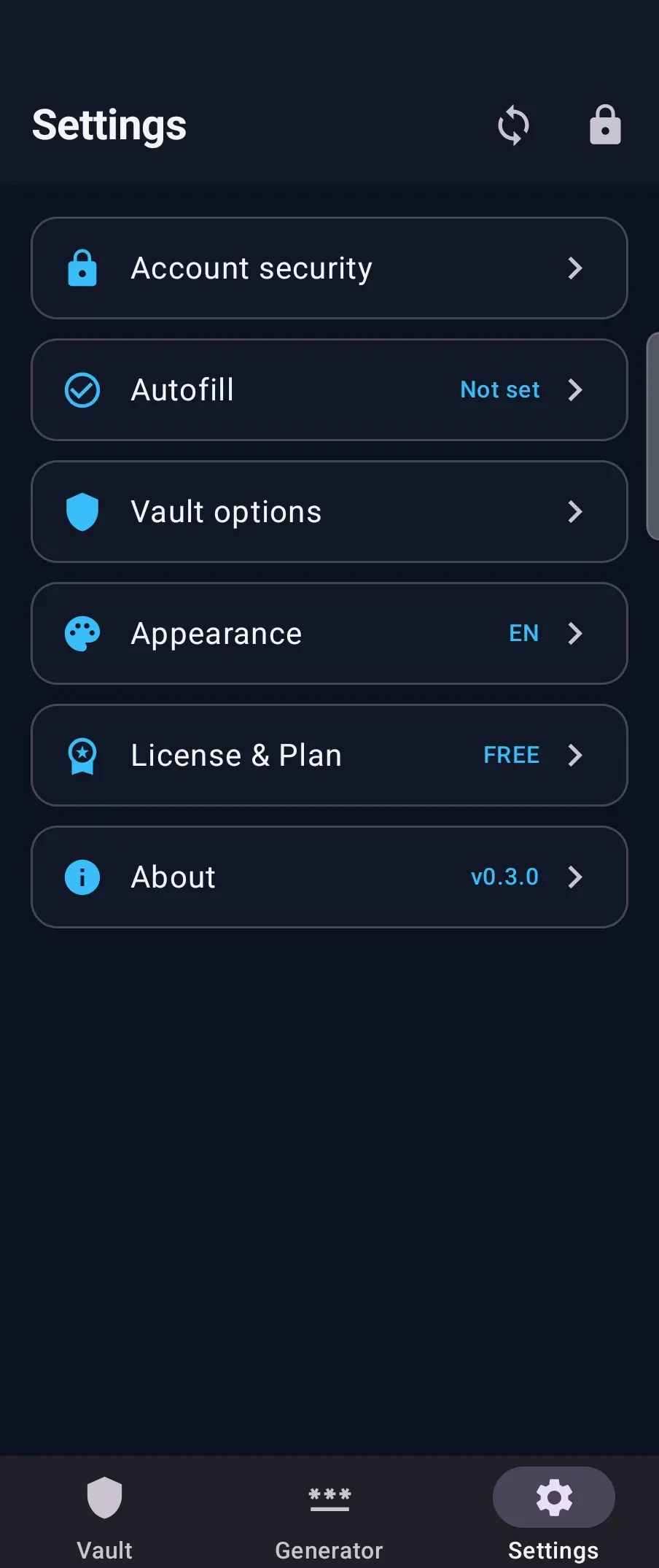
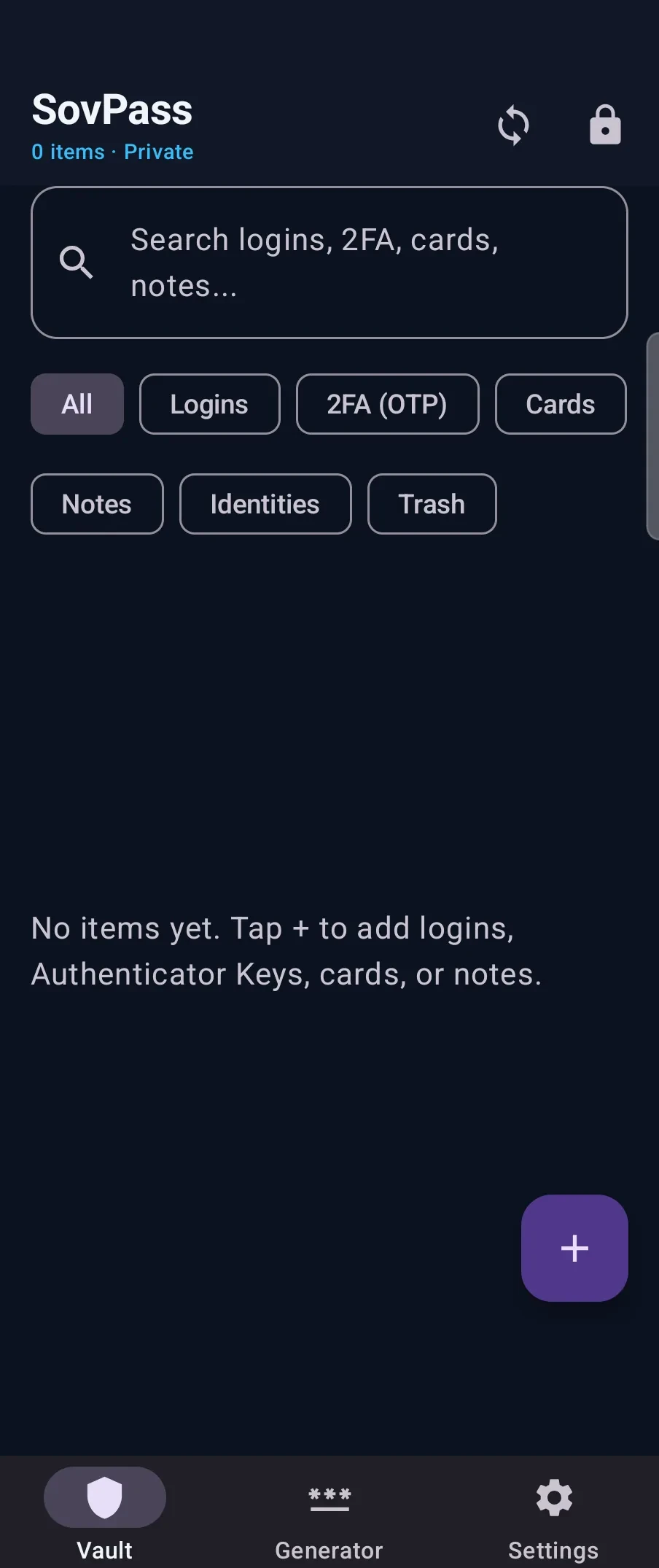
Real SovPass mobile interface · Paired with Chrome/Edge Extension
SECURITY & DATA OWNERSHIP GUARANTEE
Your passwords never leave for any provider server or cloud.
Unlike cloud-hosted password managers that store your vault on company servers, SovPass stores your entire vault strictly on your own device. When you choose to sync across devices, it connects directly to your personal Google Drive—bypassing developer servers completely.
Your vault is created and protected locally on your phone or browser. Even completely offline, every login and 2FA code remains accessible.
HORIZON GIFT LLC has zero access to your Master Password or vault records—there is no central provider database to breach or leak.
Want multi-device sync? Connect your personal Google account once to store your protected backup directly in your own private Drive app folder.
CROSS-DEVICE SYNC
Save on phone. Install extension. Autofill everywhere.
Sync logins, 2FA codes, cards, and notes seamlessly between your phone and Chrome/Edge browser via your own Google Drive.
Save & Connect on Mobile
Add logins, 2FA codes, cards, or notes in SovPass on your phone and tap Connect & Sync Google Drive once.
Install Browser Extension on PC
Add the SovPass extension to Chrome, Edge, or Brave and unlock with your Master Password to pull your vault from Google Drive.
Auto-Sync & Autofill Everywhere
Any password saved or edited on your PC browser merges back to your phone automatically—ready for 1-tap autofill everywhere.
SovPass Browser Extension (v1.0.0)
213 KB · ZIPFree companion extension · Direct ZIP download now · Chrome Web Store & Edge Add-ons coming soon
Install on Your PC Browser (4 Quick Steps)
- 1Download & unzip the package
Click Download Extension below, then extract sovpass-extension-v1.0.0.zip into a permanent folder on your computer (for example, Documents/SovPass-Extension). Keep this folder so the browser can load it.
- 2Open your browser Extensions page
Open Chrome, Edge, Brave, or Cốc Cốc, type the address below into the address bar, and press Enter.
chrome://extensions | edge://extensions - 3Turn on Developer mode
Switch on the “Developer mode” toggle at the top-right (Chrome/Brave) or left sidebar (Edge) to reveal the install button.
- 4Load the unzipped folder & pin SovPass
Click “Load unpacked”, select the extracted sovpass-extension-v1.0.0 folder, then click the puzzle icon on your browser toolbar and pin SovPass for 1-click access.
How to Sync & Use Every Day (4 Steps)
- 1Sign in to the same Google Drive as your phone
Click the pinned SovPass shield icon, choose English or Tiếng Việt if needed, and tap Connect Google Drive using the exact Google account you enabled on your phone.
- 2Unlock with your Master Password
Enter the same Master Password you created on your phone. Your logins, 2FA codes, cards, and notes appear immediately inside your browser—or create a brand-new vault right on PC.
- 31-click Autofill & live 2FA codes
Visit any login page and open SovPass to see matching accounts automatically at the top. Click once to fill username & password, or copy the live 6-digit 2FA code.
- 4Auto-Save new logins & sync back to mobile
Whenever you sign up or log in to a new website on your computer, SovPass offers to save it and automatically merges changes back to your private Google Drive so your phone stays up to date.
INTERACTIVE FEATURE TOUR
Everything you need, framed clearly on real screens
Select a category below to explore real screens and everyday features.
Manage every credential in one clean vault
Find any login, bank card, secure note, or identity in a split second with instant search suggestions and wrapped category filters.
- Store unlimited logins with multiple websites & app links, password history, and custom fields.
- Keep Visa/Mastercard/JCB/Napas cards, recovery codes, and ID/Passport details neatly organized.
- Always confirms before deletion and holds removed items safely in Trash for instant recovery.
ALL-IN-ONE VAULT
Six item types kept safe in one place
Website & App Logins
Store usernames, strong generated passwords, password history, multiple website & app links, 2FA setup keys, and custom fields.
2FA Authenticator
Standalone or login-linked OTP generator supporting camera QR scan and manual setup keys with live 30-second countdown.
Payment Cards
Keep Visa, Mastercard, JCB, or domestic bank card numbers, expiry dates, CVV, and PINs neatly masked with 1-tap copy.
Secure Notes & Recovery Codes
Protect 2FA backup recovery codes, software keys, private notes, and sensitive checklists inside your locked vault.
Personal Identities
Organize full name, phone, email, national ID/passport numbers, and mailing addresses for quick access.
Trash & Safe Delete
Always asks for confirmation before deleting and holds removed items in Trash so you can restore accidental deletions.
PLANS & LICENSING
Free forever, or upgrade to Ad-Free Pro
Every core security, 2FA, and Google Drive sync feature is included in the Free tier. Upgrade via Google Play / App Store anytime.
Free Tier
Unlimited passwords & PC Extension sync forever. Limited to 10 active 2FA/QR codes and includes light banner ads outside your Vault.
- Unlimited website logins, cards, notes, identities & PC Extension sync
- Up to 10 active 2FA / QR Authenticator codes
- Shows light banner ads on Generator & Settings tabs (clean Vault)
- Standard support only (no Store Pro perks or ad removal)
Pro · Annual
Unlocks unlimited 2FA/QR codes, removes all ads completely, and locks in our $2.99/year Early Bird price before future increases.
- Unlimited 2FA / QR Authenticator codes (no 10-code cap)
- 100% Ad-free across every screen (Generator & Settings included)
- All unlimited logins, cards & two-way PC Extension sync from Free
- Official Google Play / App Store billing, Promo Codes & Restore Purchases
Pro · Lifetime
Early Bird one-time purchase — enjoy unlimited 2FA/QR and an ad-free vault permanently without recurring $2.99/year billing.
- Unlimited 2FA/QR codes + 100% Ad-free forever — zero renewal
- Pay once ($10.99) — save permanently vs. annual renewals
- One-tap Restore Purchases on new devices via Store account
- Includes future Pro enhancements & priority developer support
| Criteria | Free ($0) | Pro · Annual ($2.99/yr) | Pro · Lifetime ($10.99) |
|---|---|---|---|
| Logins, Cards, Notes, Identities & PC Sync | Unlimited | Unlimited | Unlimited |
| 2FA / QR Authenticator Codes | Up to 10 codes | Unlimited | Unlimited Forever |
| In-App Banner Ads | Light ads (Generator & Settings) | 100% Ad-Free | 100% Ad-Free Forever |
| Billing & Price Lock | Free forever | $2.99 / year (Early Bird) | $10.99 one-time · Zero renewal |
| Store Promo Codes & Priority Support | Standard support | Included (During term) | Included Forever |
REQUIREMENTS & COMPATIBILITY
SovPass Specifications
Built for total privacy ownership: zero developer-hosted password servers, instant on-device autofill, and optional private sync directly inside your own Google Drive.
- Category
- Security & Password Management
- Platforms
- Android 8.0+, iOS (planned), Chrome / Edge Extension
- Android Package Size
- ~2.3 MB on Google Play
- Extension Size
- 213 KB (ZIP · v1.0.0)
- Sync Storage
- Personal Google Drive (Private App Folder) · Phone ↔ PC
- Languages
- English & Tiếng Việt
FAQ
Common Questions
SovPass · v1.0.0Take back full ownership of your passwords & 2FA
Need help testing the Android Beta, Chrome/Edge Extension, or activating a Pro license? Contact our engineering team directly.