
Run multiple accounts. Keep your phone light & cool.
Stay signed in to multiple Zalo, WhatsApp, Messenger, Facebook, Telegram, and shopping accounts on one Android phone without switching back and forth. SovClone keeps every copy neatly isolated on your phone, automatically puts idle copies to sleep to save battery, and lets you lock private accounts with a PIN or fingerprint.
- Up to 5 separate app copies free — no account sign-in required
- Batch clone 1–5 copies at once with color-coded icon frames or custom photos
- Smart Auto-Sleep, 1-tap Sleep All & Work Quiet Hours keep battery cool
- Private Space with full-screen PIN keypad, Fingerprint unlock & safe recovery
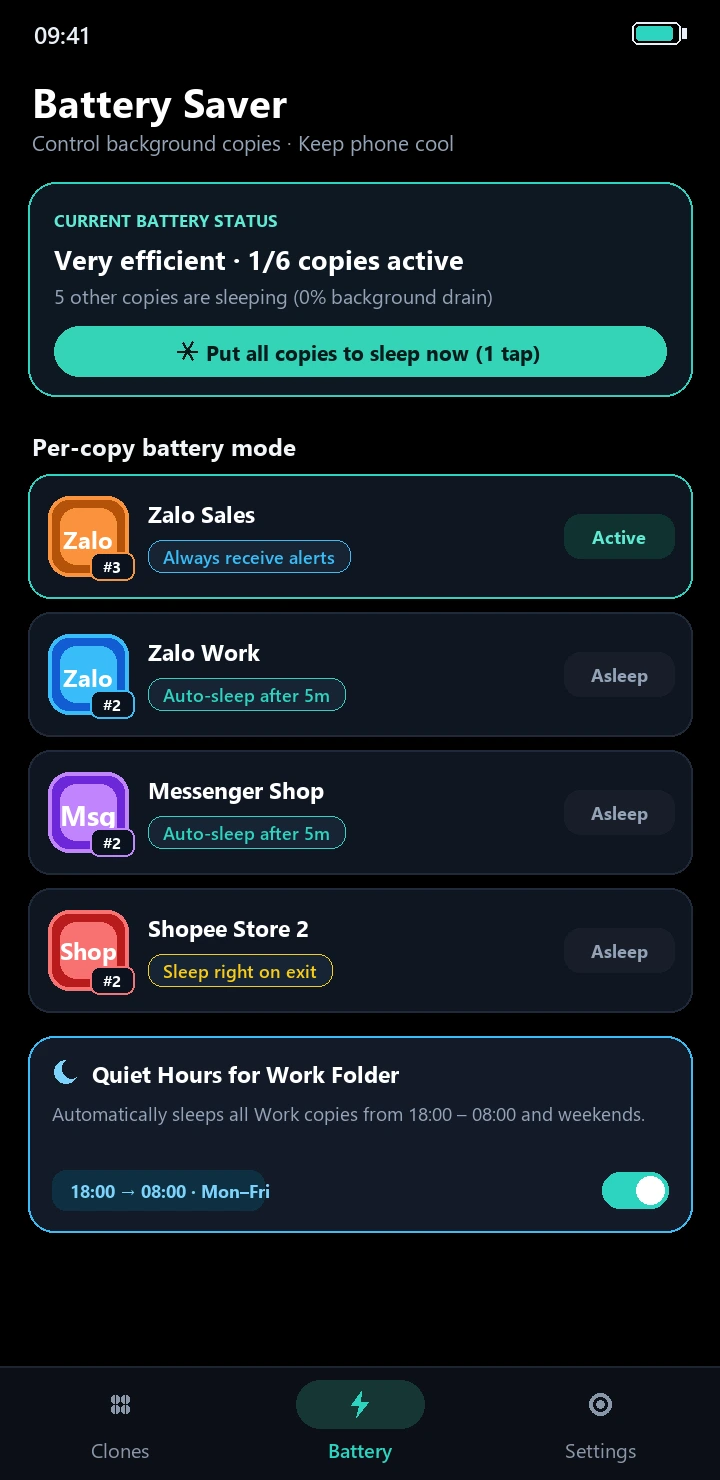
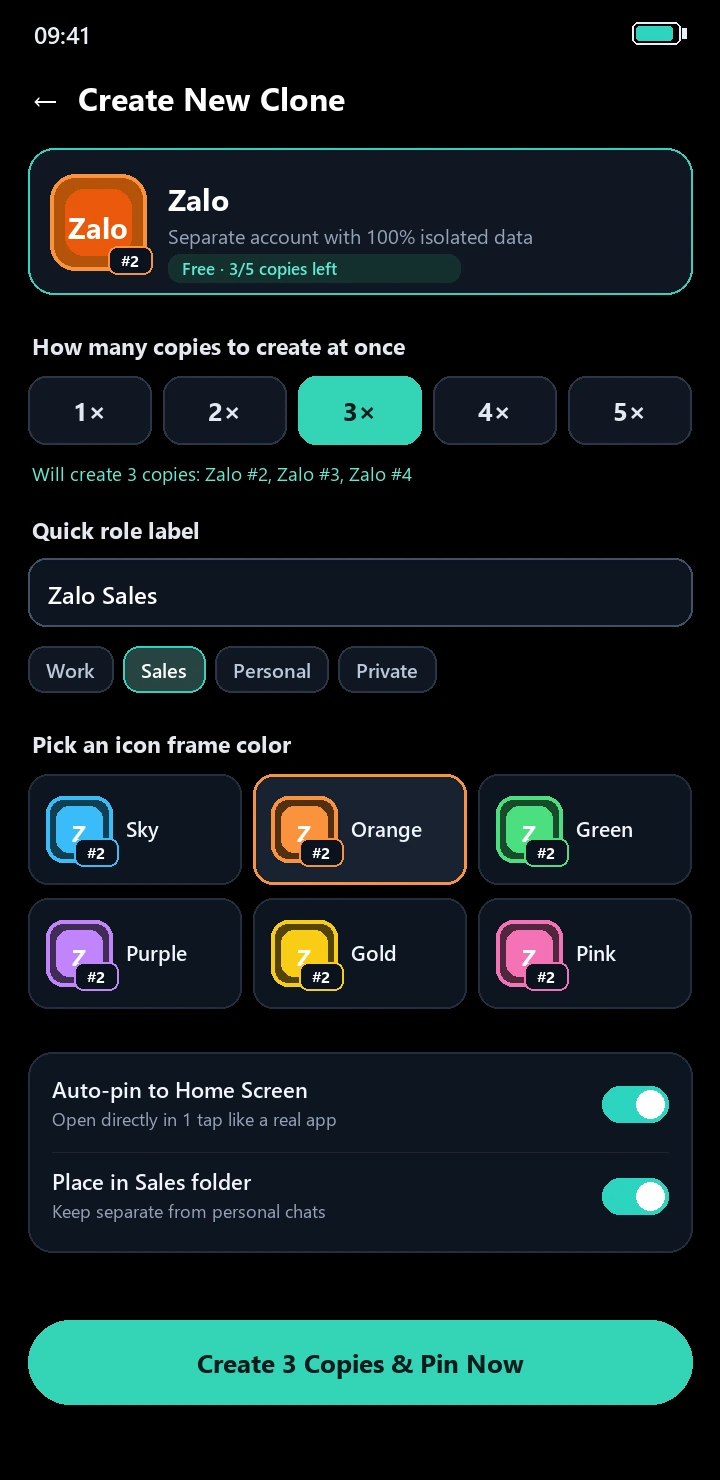
Real SovClone screens — Pure Black AMOLED for battery savings and crisp Light Mint for daytime clarity.
LIGHTWEIGHT & PRIVATE BY DESIGN
Multiple accounts without bloated storage or dead batteries
Instead of keeping every cloned app awake all day, SovClone shares the base app files safely on your device, isolates each account's login and chats, and puts inactive copies to sleep automatically when you step away.
Each copy stores its own messages, logins, and settings inside a separate space. Clearing or deleting a copy never affects your main app.
Keep your main sales chat set to Always Receive Alerts, set work apps to Auto-Sleep after 5 minutes, and set occasional tools to Sleep Right on Exit.
Hide sensitive copies behind a dedicated PIN & Fingerprint lock screen. Forgot your PIN? Verify with your phone's screen lock to reset it without losing data.
READY IN 3 SIMPLE STEPS
Pick an app. Label & color it. Open in 1 tap.
No sign-up, no confusing menus — organize Work, Sales, Personal, and Private accounts in under a minute.
1. Pick an app & choose 1–5 copies
Tap + Add App, choose Zalo, WhatsApp, Messenger, Facebook, Telegram, or shopping apps, and pick how many copies you need.
2. Pick a clear name, color frame & folder
Use quick role labels (Work, Sales, Personal), choose from 6 colored frames or a custom gallery photo, and place it into a folder or Private Space.
3. Pin to Home Screen & let Auto-Sleep handle battery
Pin each copy right onto your Home Screen for direct 1-tap launch, while Smart Auto-Sleep and Work Quiet Hours keep your phone cool.
INTERACTIVE FEATURE TOUR
Everything you need, framed clearly on real screens
Select a category below to explore real screens and everyday features.
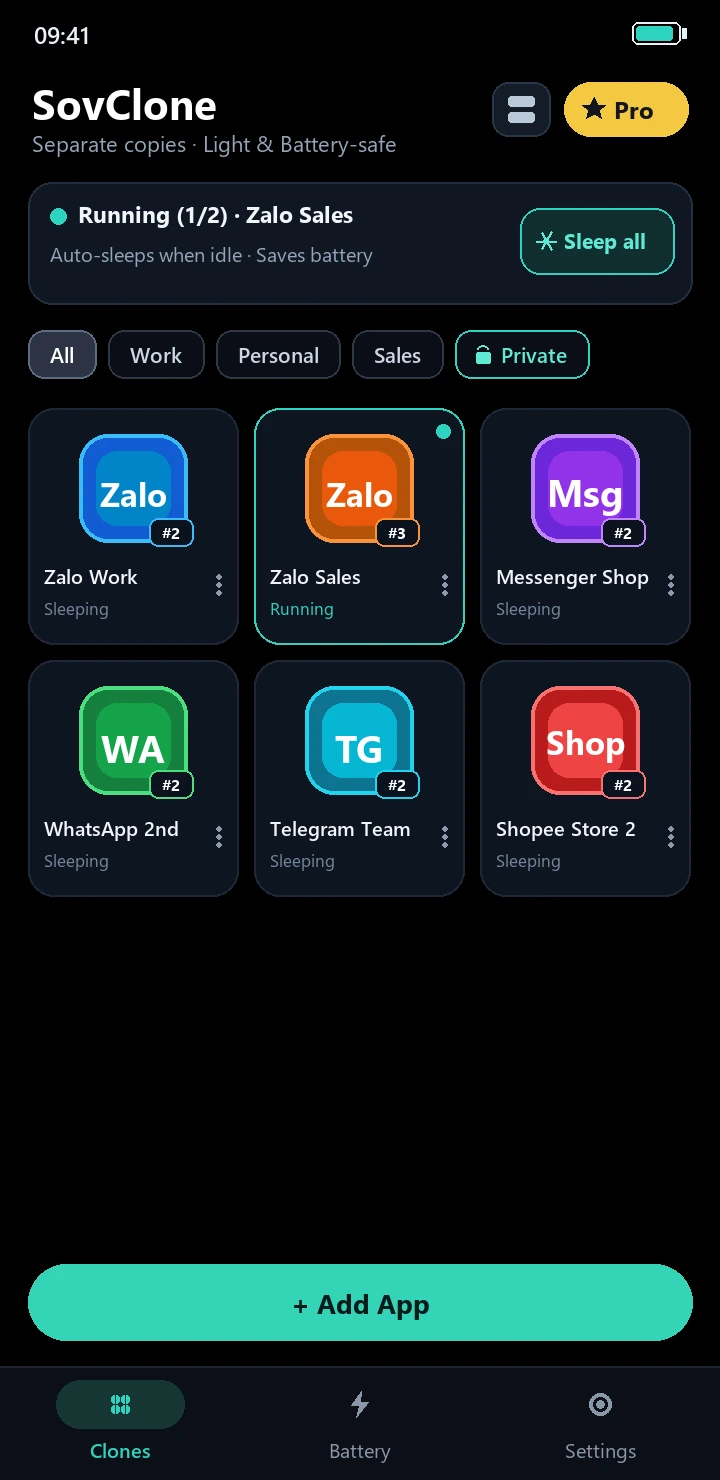
Every account organized in one clean launcher
See which copy is running, put everything to sleep in 1 tap, filter by wrapped folder pills, and launch any account immediately.
- 3-column compact grid lets you see 6–9 accounts without endless scrolling
- Color-coded frames and numbered badges (#2, #3...) prevent opening the wrong account
- Live running strip with 1-tap Sleep All keeps your phone fast and cool
EVERYDAY MULTI-ACCOUNT TOOLKIT
Six thoughtful features built for daily reliability
Clean, well-spaced controls — easy to reach with one hand on both compact and foldable screens.
Compact 3-Column Grid & Folders
See all your copies at once in a clean launcher grid, switch to detailed cards anytime, and filter by Work, Personal, Sales, or Private.
Batch Clone 1–5 Copies
Need multiple shop or team accounts? Create up to 5 numbered copies in a single flow instead of repeating setup step by step.
6 Icon Frames & Custom Photos
Preview 6 vibrant frames live before saving, or pick any photo from your gallery to customize both the grid card and Home Screen shortcut.
1-Tap Direct Home Shortcuts
Pin any copy onto your Android Home Screen so tapping it opens that account straight away without flashing an intermediate dashboard.
Smart Auto-Sleep & Per-App Battery
Choose Auto-Sleep after 5 minutes, Always Receive Alerts, or Sleep on Exit per copy, plus a 1-tap Sleep All button and on-demand Google Sign-In toggle.
Private Space Lock & Dual Themes
Protect hidden copies with PIN + Fingerprint (plus safe phone-lock PIN recovery) and switch freely between Pure Black AMOLED and Light Mint.
HOW-TO GUIDES
Everyday step-by-step guides for SovClone
Run 2 or 3 Zalo / WhatsApp / Messenger accounts at once
- Open SovClone and tap the big + Add App button at the bottom.
- Select Zalo, WhatsApp, or Messenger, pick how many copies (1–5), name them clearly (e.g. Work, Sales), and choose distinct frame colors.
- Turn on Auto-pin to Home Screen, tap Create, then open each icon and sign in with its own phone number or account.
Save battery while keeping your important sales chat online
- Switch to the Battery tab at the bottom of SovClone.
- Set your primary sales chat to Always Receive Alerts, while leaving secondary accounts on Auto-Sleep (5m) or Sleep on Exit.
- Turn on Work Quiet Hours so work copies automatically sleep after business hours and on weekends.
Hide & lock a private account so others cannot see it
- Tap the 3-dot button on any copy and choose Move Folder → Private.
- Set a 4–6 digit PIN and turn on Fingerprint / Face unlock when prompted.
- Your copy disappears from the main grid and only appears when you unlock the Private folder.
Detailed Illustrated Guides for SovClone (5)
All GuidesHow to Run 2, 3, or 5 Zalo, WhatsApp, Messenger & Facebook Accounts on One Android Phone
Separate Personal, Work, and Sales chats cleanly on one phone without logging out — with color-coded icon frames, Home Screen shortcuts, and zero battery drain.
How to Clone Android Apps, Batch Create 1–5 Copies & Pin Home Shortcuts
A beginner-friendly visual walkthrough to cloning apps, customizing icon frames or gallery photos, and fixing missing Home shortcuts on Xiaomi, Oppo, and Samsung.
How to Run Multiple Accounts on Android Without Draining Battery or Slowing Down
Stop cloned apps from draining battery overnight. Learn how to combine Auto-Sleep, 1-tap Sleep All, Per-App Battery Modes, and Work Quiet Hours.
How to Hide & Lock Private Cloned Apps with PIN & Fingerprint on Android
Keep sensitive accounts completely out of sight when friends or family borrow your phone — protected by Private Space PIN, Fingerprint unlock, and safe passcode recovery.
6 Best Ways to Clone Apps on Android in 2026 (Honest Comparison)
Comparing Samsung Dual Messenger, Xiaomi Dual Apps, Android Work Profile (Shelter), Parallel Space, CloneBox, and SovClone honestly across account limits, battery life, and ads.
PLANS & LICENSING
Start free with 5 copies — upgrade only when you need more
Every core cloning, icon customization, shortcut, battery saver, and private lock feature works in the Free tier.
SovClone Free
Ideal for separating personal, work, and side-business accounts with up to 5 active copies, custom color frames, auto-sleep battery saver, and Private Space lock.
- Up to 5 isolated app copies (Zalo, WhatsApp, Messenger, Facebook...)
- 6 color icon frames, custom gallery photos & 1-tap Home shortcuts
- Smart Auto-Sleep, 1-tap Sleep All & Private Space PIN/Fingerprint lock
- Light banner ads (0% full-screen popups on your first session)
SovClone Pro · Annual
Built for online sellers, community managers, and power users managing 6+ accounts with a clean, completely ad-free workspace.
- Unlimited isolated app copies across all apps
- 100% Ad-Free across every screen
- 7-day free trial via Google Play · Cancel anytime
- Sync Pro across up to 5 personal Android devices
SovClone Pro · Lifetime
Skip recurring subscriptions forever. One small payment unlocks unlimited copies, zero ads, and all future SovClone Pro updates.
- Unlimited app copies + 100% Ad-Free forever
- Pay once ($12.99) — zero subscriptions or renewals
- 1-tap Restore Purchases when switching to a new phone
- Priority support from HORIZON GIFT LLC
| Feature | Free ($0) | Pro · Annual ($4.99/yr) | Pro · Lifetime ($12.99) |
|---|---|---|---|
| Number of Separate App Copies | Up to 5 copies | Unlimited | Unlimited Forever |
| Color Icon Frames, Custom Photos & Direct Home Shortcuts | Included Free | Included | Included Forever |
| Smart Auto-Sleep, Work Quiet Hours & Private Space Lock | Included Free | Included | Included Forever |
| Ads inside App | Light ads (0% on first session) | 100% Ad-Free | 100% Ad-Free Forever |
| Billing & Device Sync | $0 forever · No sign-in | 7-day trial · Up to 5 devices | One-time · Up to 5 devices |
REQUIREMENTS & COMPATIBILITY
SovClone Specifications
Start immediately with up to 5 free copies, batch clone 1–5 copies at once, 6 color-coded icon frames, 1-tap Home Screen shortcuts, and automatic battery sleep.
- Category
- Multi-Account & Everyday Productivity
- Platform
- Android 8.0 and above (Optimized for compact & foldable phones)
- Data Privacy
- 100% on-device isolation · No login required · Minimal clean permissions
- Battery Management
- Per-copy Auto-Sleep, 1-tap Sleep All & Work Quiet Hours
- Languages
- English & Vietnamese
- Publisher
- HORIZON GIFT LLC (Wyoming, USA)
FAQ
Common Questions
SovClone · v1.0.0Separate every account. Keep your battery cool.
Start with 5 free copies right away, read our step-by-step illustrated guides, or contact our team for Android testing and Pro support.